What Happened to AT&T Digital Life? Is It Still Available and What Are the Alternatives?
Learn what happened to AT&T Digital Life, whether the legacy home-security service is still available, how it differs from AT&T Connected Life, what existing customers should check, and which home-security alternatives to compare.
In this article
- What Was AT&T Digital Life?
- What Happened to AT&T Digital Life?
- Is AT&T Digital Life Still Available to New Customers?
- What Is AT&T Connected Life?
- Connected Life's newer Gemini features
- Connected Life pricing
- AT&T Digital Life vs. AT&T Connected Life
- What Existing AT&T Digital Life Customers Should Do
- 1. Confirm whether your account is active
- 2. Review your latest bill
- 3. Make an inventory of your equipment
- 4. Ask about migration or replacement options
- 5. Plan before canceling
- Can You Reuse AT&T Digital Life Equipment?
- What to check before reusing equipment
- Should you keep the old sensors?
- AT&T Digital Life Alternatives
- SimpliSafe
- Ring
- ADT
- Abode
- Vivint
- Comparing the alternatives
- How to Choose a Replacement for AT&T Digital Life
- Decide between self-monitoring and professional monitoring
- Determine which equipment you actually need
- Compare the complete cost
- Check internet and power requirements
- Review installation and support
- Switching From AT&T Digital Life: A Practical Checklist
- Conclusion
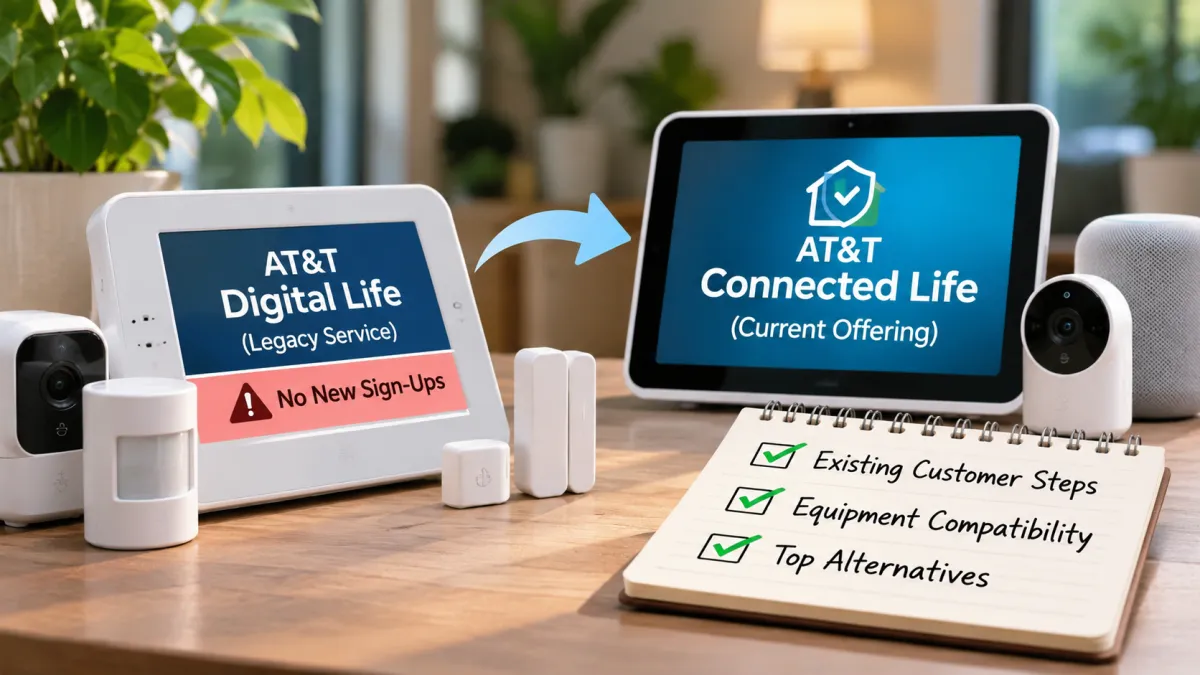
AT&T Digital Life was a home-security service that allowed customers to monitor and control parts of their homes through connected security equipment. The service is now a legacy offering, and AT&T no longer accepts new Digital Life sign-ups. Existing customers may have different account and support arrangements, so they should verify their current status directly with AT&T.
AT&T has since introduced Connected Life, a newer connected-home security offering. However, Connected Life is not simply Digital Life under a new name. The equipment, technology, service options, and compatibility considerations are different.
If you previously used Digital Life or are considering a replacement, the important questions are whether your current account remains active, what happens to your existing equipment, and which home-security system makes sense for your home. This guide explains the differences and outlines practical options to compare.
What Was AT&T Digital Life?
AT&T Digital Life was a connected home-security and automation service. It brought together security devices and remote controls so customers could manage aspects of their homes through a connected system.
Depending on the equipment and service configuration, a Digital Life setup could include:
-
A central security panel or control device
-
Door and window sensors
-
Motion sensors
-
Security cameras
-
Connected locks
-
Other home-automation devices
The system was designed to let users monitor their homes and control supported devices remotely. For example, a homeowner could use the system to check a security status or receive alerts from compatible sensors.
Digital Life was more than a standalone alarm panel. It was a service tied to a particular equipment ecosystem and account.
That distinction matters today. A legacy Digital Life customer may have devices installed throughout a home, but those devices do not necessarily function independently of the original service. Their ability to continue working depends on the hardware, service arrangement, and available support.
What Happened to AT&T Digital Life?
AT&T Digital Life became a legacy home-security service and is no longer available for new customer sign-ups.
The change does not automatically mean that every existing customer's system stopped working at the same time. Legacy customers may have different account statuses and service arrangements. Some may still have an active account, while others may need to consider a replacement.
It is important to distinguish between three situations:
| Customer situation | What it means |
|---|---|
| Existing customer with an active account | The customer should confirm current service, billing, and support terms with AT&T. |
| Former customer with installed equipment | The equipment may remain in the home, but its current functionality and compatibility need to be checked. |
| Person interested in signing up for Digital Life | Digital Life is not available for new sign-ups; another home-security service should be considered. |
There is no reason to assume that every customer has the same account status or migration option. A customer's individual terms may depend on their service history and account.
For this reason, the safest approach is to verify the status of the account rather than relying on an old Digital Life webpage, a past bill, or an online discussion.
Is AT&T Digital Life Still Available to New Customers?
No. AT&T Digital Life is a legacy service and is not available to new customers.
If you are shopping for a home-security system today, you should compare currently offered services rather than looking for a new Digital Life subscription.
Existing customers should not confuse the lack of new sign-ups with a confirmed universal shutdown date for all legacy accounts. Account-specific service information should come directly from AT&T.
Before making a decision, determine which of these applies:
-
You are an existing Digital Life subscriber and want to keep your system.
-
You have Digital Life equipment but no longer have an active subscription.
-
You are a new customer looking for a home-security system.
-
You want to replace Digital Life with a different provider.
These situations require different next steps. An existing customer may need account clarification, while a new customer can focus on comparing current security products.
What Is AT&T Connected Life?
AT&T Connected Life is a newer connected-home security offering from AT&T. It integrates Google Home and Nest devices with home-security services, including professional monitoring options associated with Abode.
Connected Life uses a different technology approach from the original Digital Life service. It is built around connected devices and a newer home-security ecosystem.
AT&T introduced Connected Life in December 2025. Its features and plan details may change over time, so anyone considering the service should check the current official information before signing up.
Connected Life may be worth investigating if you want a connected-home security service associated with AT&T. However, it should not be treated as an automatic continuation of an existing Digital Life account.
A Digital Life customer should verify whether AT&T offers an account-specific migration or replacement option. Do not assume the original panel, sensors, or subscription will transfer directly.
Connected Life's newer Gemini features
AT&T announced additional Gemini-powered features for Connected Life in November 2026. The announced features include more descriptive camera-event information, natural-language searches of recorded video, Home Brief activity summaries, and proximity-based automatic arming or disarming.
Some advanced capabilities depend on the selected plan and require an active internet connection and Wi-Fi. Feature availability and performance may vary.
These are Connected Life features—not features that should be attributed to the legacy Digital Life system. Readers should confirm current plan eligibility and feature availability with AT&T before making a purchase decision.
Connected Life pricing
Connected Life plan pricing should be checked directly with AT&T at the time of purchase.
Public plan information and newer reports may not show identical prices. A price seen on an older page may no longer reflect the current checkout offer.
When comparing Connected Life with another provider, consider the complete cost:
-
Equipment purchase
-
Monthly monitoring
-
Installation, if applicable
-
Any required service plan
-
Contract terms
-
Cancellation conditions
Do not use an old Digital Life bill as a reliable estimate of Connected Life pricing. The two offerings are different services.
AT&T Digital Life vs. AT&T Connected Life
The names are similar, but the services should be considered separately.
| Comparison factor | AT&T Digital Life | AT&T Connected Life |
|---|---|---|
| Service status | Legacy service; unavailable for new sign-ups | Newer offering introduced in 2025 |
| Technology | Original Digital Life equipment ecosystem | Google Home and Nest-connected ecosystem |
| New customer sign-up | Not available | Check current availability |
| Existing customer migration | No universal migration path confirmed | Eligibility must be verified with AT&T |
| Equipment | Legacy Digital Life devices | Connected Life-compatible devices |
| Features | Depend on legacy equipment and account | Features depend on supported devices and selected plan |
| Pricing | Existing account terms may vary | Verify current official plan pricing |
| Compatibility | Do not assume compatibility with new systems | Check supported devices and requirements |
The most important difference is the underlying equipment and service ecosystem. Connected Life should not be considered a direct replacement that automatically preserves a Digital Life customer's setup.
If you are already using Digital Life, contact AT&T before purchasing Connected Life equipment. Ask whether your account has a migration option and whether any existing devices can be retained.
If you are a new customer, compare Connected Life with other currently available home-security providers based on your budget, monitoring needs, installation preferences, and home layout.
What Existing AT&T Digital Life Customers Should Do
If you still have Digital Life equipment installed, avoid making a rushed decision. Start by identifying your account status and understanding what is currently working.
1. Confirm whether your account is active
Contact AT&T through its official customer-support channels. Ask for confirmation of:
-
Whether your Digital Life account is active
-
Whether monitoring is still included
-
Whether your billing arrangement remains in effect
-
What support is currently available
-
Whether any service changes are planned for your account
Do not assume that a device displaying a normal status means that every service associated with the account remains active.
2. Review your latest bill
Look for any Digital Life-related charges. Check the service description, monthly amount, and any changes from previous billing periods.
If a charge is unclear, ask AT&T to explain it. Avoid relying on an old price mentioned in a forum or article because account terms can differ.
3. Make an inventory of your equipment
Record the equipment installed in your home. A basic inventory might include:
| Equipment | Details to record |
|---|---|
| Control panel | Model number and condition |
| Door/window sensors | Quantity and location |
| Motion sensors | Quantity and model |
| Cameras | Model and connection type |
| Smart locks | Brand and model |
| Other devices | Type, model, and current function |
Photographs of device labels can help when asking a provider about compatibility.
4. Ask about migration or replacement options
Ask AT&T whether it offers a direct migration, replacement purchase, or other account-specific option.
Do not assume that a new Connected Life subscription will preserve your original equipment or monitoring arrangement. Ask which devices, if any, would need to be replaced.
5. Plan before canceling
If you rely on home-security monitoring, understand the effect of cancellation before ending the service.
Determine when monitoring would stop, whether any equipment needs to be returned, and whether the replacement system can be installed and activated before the old arrangement ends.
If your household depends on alarms or security notifications, avoid leaving an extended gap between systems.
Can You Reuse AT&T Digital Life Equipment?
Possibly, but compatibility is not guaranteed.
Some home-security devices use communication protocols or integrations that are specific to a particular system. A sensor that worked with Digital Life may not pair with a different provider's control panel.
The answer depends on the specific device, model, firmware, communication method, and the new provider's supported equipment.
What to check before reusing equipment
Before keeping a legacy device as part of a replacement system, confirm:
-
The exact manufacturer and model
-
Whether the device is supported by the replacement provider
-
Whether it requires the original Digital Life panel
-
Whether it can be reset or paired with another system
-
Whether replacement batteries or accessories are available
-
Whether the provider supports its communication protocol
A provider may support some third-party devices while excluding others. Compatibility should be confirmed for each device rather than assumed for the entire collection.
Should you keep the old sensors?
If your old sensors are still physically installed, you may choose to leave them in place until the new system is ready. However, do not rely on them for active protection unless you have confirmed that they are functioning as part of an operational security system.
When installing a replacement, the provider may recommend new sensors or other hardware. This can increase the initial cost, but it may simplify installation and support.
AT&T Digital Life Alternatives
If Digital Life is no longer suitable for your needs, several home-security providers are worth comparing. Each offers a different combination of equipment, monitoring, installation, and service arrangements.
The best choice depends on how you want to manage security in your home.
SimpliSafe
SimpliSafe is a home-security provider known for systems that can be installed by the homeowner, with professional monitoring options.
It may be worth comparing if you prefer a straightforward setup and want to evaluate the choice between self-managed security and paid monitoring.
Before choosing SimpliSafe, check the equipment package, monitoring plan, supported devices, and current terms. Do not assume your old Digital Life sensors will work with it.
Ring
Ring offers connected security devices such as cameras, video doorbells, and alarm equipment.
Ring may be a useful option for households that want to focus on cameras, entry monitoring, and connected-device features. The appropriate system depends on which products you select and whether you want a monitoring service.
Review device compatibility, subscription requirements for desired features, and installation needs. An individual Ring camera does not necessarily provide the same functionality as a complete monitored alarm system.
ADT
ADT is a home-security provider with professionally installed and monitored security options, as well as different equipment and service offerings.
ADT may be worth considering if professional installation and monitoring are important to your household.
Compare the specific plan's contract terms, installation costs, equipment, and cancellation conditions. Terms can differ across offers, so use the details for the plan you are actually considering.
Abode
Abode offers home-security equipment and monitoring options, including connected-home integrations.
Abode may be relevant for households interested in flexible security arrangements and smart-home integration. AT&T Connected Life also involves Abode monitoring, but that does not mean every Abode product or plan is identical to Connected Life.
Check the exact equipment, supported integrations, and monitoring terms before choosing.
Vivint
Vivint offers professionally installed smart-home security systems and connected equipment.
It may be a fit for people who prefer a more integrated installation and security setup. However, the total cost and service terms need careful review.
Ask for the equipment list, installation charges, monitoring cost, contract duration, and cancellation terms before committing.
Comparing the alternatives
Use this table as a starting point. The exact features, prices, and terms depend on the current package offered by each provider.
| Provider | Worth considering for | What to verify |
|---|---|---|
| SimpliSafe | DIY-oriented home-security setup | Equipment package, monitoring plan, device support |
| Ring | Camera and connected-device-focused security | Subscription features, alarm equipment, monitoring |
| ADT | Professional installation and monitoring | Contract, installation charges, monitoring terms |
| Abode | Flexible security and smart-home integration | Supported devices, integrations, monitoring options |
| Vivint | Integrated professionally installed system | Equipment costs, installation, contract, cancellation |
Do not choose a provider solely because it has a similar name, a familiar brand, or an advertised starting price. Compare the full system and its terms.
How to Choose a Replacement for AT&T Digital Life
Replacing a home-security system is not just a matter of selecting a new brand. The replacement needs to match the home's layout, the household's security needs, and the way the owner wants to manage the system.
Decide between self-monitoring and professional monitoring
Self-monitoring generally means that you manage alerts and system activity yourself. Professional monitoring involves a monitoring service that responds according to the plan's procedures.
Consider your household's needs:
-
Do you want to receive alerts and handle them yourself?
-
Do you want a professional monitoring service?
-
Will someone regularly be home?
-
Do you travel frequently?
-
Do you need security coverage when nobody is home?
Review the provider's monitoring terms carefully. A camera subscription, alarm service, and professional monitoring plan may offer different functions.
Determine which equipment you actually need
You may not need to replace every part of your Digital Life setup with an equivalent device.
For example, a household may need entry sensors and an alarm panel more than it needs multiple cameras. Another household may place greater importance on video monitoring around entryways.
Consider the areas you want to protect:
-
Exterior doors
-
Accessible windows
-
Garage entrances
-
Main living areas
-
Driveways or outdoor spaces
Choose equipment based on the areas and functions you need rather than buying the largest package.
Compare the complete cost
A replacement system can involve several different expenses.
| Cost factor | What to review |
|---|---|
| Equipment | Panel, sensors, cameras, locks, and other hardware |
| Installation | DIY setup or professional installation fees |
| Monitoring | Monthly or other recurring charges |
| Connectivity | Internet requirements and any additional service costs |
| Contracts | Required service period and renewal terms |
| Cancellation | Fees, return requirements, and termination process |
| Replacement hardware | Devices that cannot be reused from Digital Life |
A lower initial equipment price may not mean a lower overall cost. Recurring monitoring fees and contract terms can affect the total expense over time.
Check internet and power requirements
Connected home-security devices may rely on home broadband, Wi-Fi, electrical power, or other communication methods.
Ask the provider what happens during:
-
A home internet outage
-
A power outage
-
A router failure
-
A weak wireless signal
-
A device battery failure
Some systems may provide backup features, but those capabilities depend on the equipment and plan. Do not assume every camera or connected feature will remain operational during an outage.
Review installation and support
If you are replacing an installed Digital Life system, installation may involve removing old equipment, mounting new devices, configuring the network, and testing sensors.
Ask the new provider whether installation is included, whether existing wiring can be used, and what support is available after setup.
If you rent your home, also check whether the installation method requires permission from your landlord.
Switching From AT&T Digital Life: A Practical Checklist
A planned transition can help reduce confusion and avoid an unnecessary gap in security coverage.
Use the following checklist before switching systems.
This checklist is especially useful for homeowners who still have legacy equipment installed. It helps separate account-related questions from the practical work of setting up a replacement.
Conclusion
AT&T Digital Life is a legacy home-security service that is no longer available to new customers. Existing subscribers should verify their individual account status, billing, and support options directly with AT&T rather than assuming that every account has been discontinued or that a universal migration path exists.
AT&T Connected Life is a newer offering built around a different connected-home ecosystem. It should not be treated as an automatic replacement for Digital Life equipment or subscriptions.
If you need a new system, compare providers such as SimpliSafe, Ring, ADT, Abode, and Vivint based on monitoring, equipment compatibility, installation, connectivity, total cost, and contract terms. Before switching, confirm what happens to your existing devices and make sure the replacement system is working as expected.
The most practical next step is to establish the status of your Digital Life account, inventory the equipment in your home, and compare replacement systems against the security features your household actually needs.
Frequently asked questions
1. Can existing AT&T Digital Life customers upgrade directly to Connected Life?
A universal direct migration path has not been confirmed. Existing Digital Life customers should contact AT&T to check account-specific upgrade, replacement, or service options before making changes.
2. Can old AT&T Digital Life equipment work with another home-security provider?
Possibly, but compatibility depends on the specific device models, communication protocols, and the new provider's supported equipment. Do not assume that old Digital Life sensors, panels, or cameras will work with another system.
3. Does AT&T Connected Life have an annual contract?
Contract requirements depend on the selected plan and current terms. Review AT&T's official Connected Life agreement and plan details before signing up.
4. Does AT&T Connected Life still work during a power or internet outage?
Connected Life requires broadband internet for its connected features. Some equipment may support wireless backup, but backup depends on power, signal, and device capabilities. Certain video features may be limited during an outage.
5. Is AT&T Connected Life available in every US state?
Availability may depend on state licensing and service eligibility. Check AT&T's current availability information for your address rather than assuming nationwide coverage.

Maya Thompson writes practical technology content covering consumer technology, software, online services, digital tools, cybersecurity basics, and everyday technology decisions. She focuses on explaining technical topic...